![Covisum_color300.png]](https://www.covisum.com/hs-fs/hubfs/Covisum_color300.png?height=40&name=Covisum_color300.png)
Step 1: Select Forgot your password?
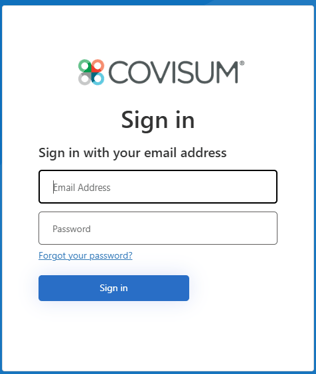
Screenshot 1 – Forgot Your Password
(Insert Image 1 showing the Sign In page with "Forgot your password?" highlighted.)
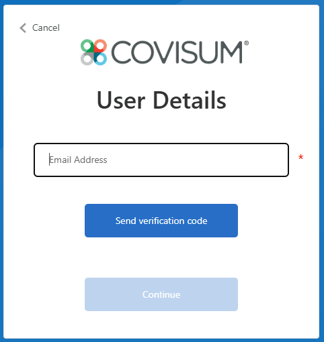
Step 2: Verify Your Email Address
- Enter your email address.
- Click Send verification code.
Step 3: Enter the Verification Code
- Retrieve the verification code from your email inbox.
- Enter the verification code when prompted.
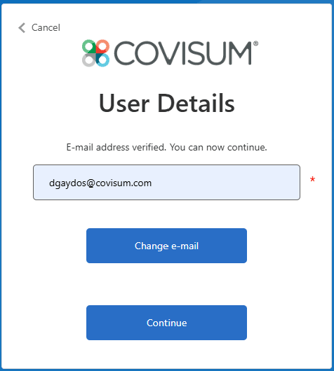
- Once verification is complete, you will see a message indicating that your email address has been verified.
- Click Continue.
Important: Do not click Change e-mail unless you entered the wrong email address and need to start over.
Step 4: Verify Your Email Address Again
You will be asked to verify your email address a second time.
- Click Send verification code.
- Retrieve the code from your email.
- Enter the code.
- Click Continue.
Expected Behavior: The second verification is required before Microsoft will allow you to create a new password. Be sure to click Continue after each verification and do not click Change e-mail.
Step 5: Create a New Password
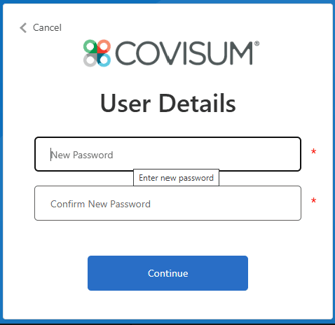
After the second verification is successfully completed, you will be prompted to create a new password.
- Enter your new password.
- Re-enter the password in the confirmation field.
- Click Continue.
Password Requirements
Your new password must:
- Be between 8 and 64 characters
- Contain at least 3 of the following 4 character types:
- Lowercase letter (a-z)
- Uppercase letter (A-Z)
- Number (0-9)
- Symbol (such as !, @, #, $, %, etc.)
Troubleshooting
I didn't receive the verification code?
- Check your Junk or Spam folder.
- Wait a few minutes and try Send verification code again.
I clicked Change e-mail by mistake.
- Re-enter your email address and restart the verification process.
I'm still unable to reset my password.
Contact Covisum Support: 877-844-7213.