![Covisum_color300.png]](https://www.covisum.com/hs-fs/hubfs/Covisum_color300.png?height=40&name=Covisum_color300.png)
Who is licensed to use the materials?
-
Primary account holders with an active subscription.
-
Team members with active associate licenses on an active subscription.
How to access the Marketing Kit
-
Sign in to your Covisum account at https://suite.covisum.com
-
Click the User Icon in the upper-right corner.
-
Select Access Portal.
-
In the left navigation, click Marketing.
-
Choose the Covisum tool you subscribe to (e.g., Social Security Timing, Tax Clarity, Income InSight, SmartRisk). The marketing kit opens in a new browser tab.
What’s included in the Marketing Kit
Resources vary by tool but generally include:
-
PowerPoint presentation slides with scripts
-
Client-facing brochures
-
Post-event email templates and follow-ups
-
Practice-management checklists and templates
-
Client intake forms
Access requirements & common issues
-
Active subscription required: If your subscription expires or is canceled, access is removed until you reactivate.
-
Correct product: You’ll only see kits for products you’re subscribed to.
-
Pop-ups/new tab: The kit opens in a new tab.
-
Team access: Ensure the team member has an active associate license under your organization. See My Team!
FAQs
Do trials include marketing materials?
Marketing materials are included with a paid subscription.
Which products have kits?
Kits are available for Social Security Timing, Tax Clarity, Income InSight, and SmartRisk.
What if I can’t find a particular template or form?
Open the kit using the steps above and browse the sections for forms and templates relevant to your product.
To access the kit:
- Login to a paid software account.
- Select the ‘Marketing’ tab in the left side navigation menu.
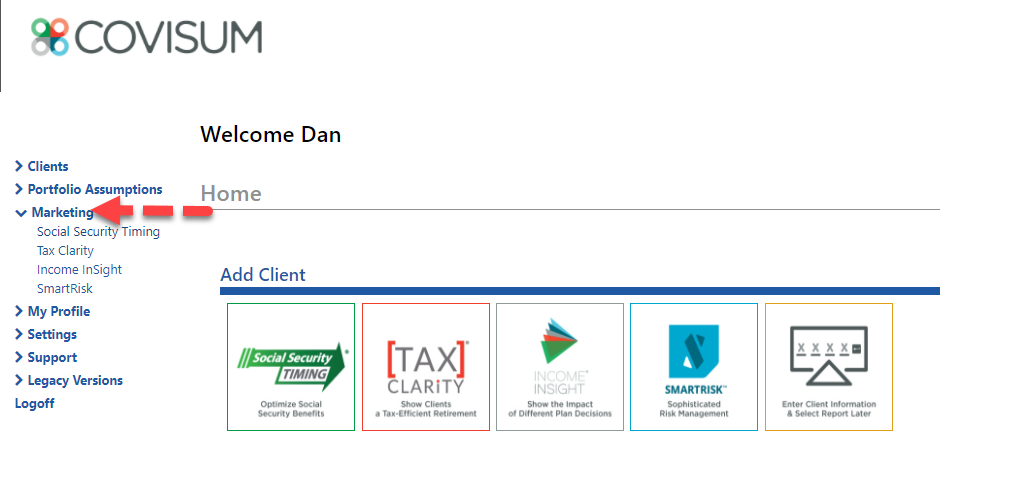
- Select the software program that you have access to through a paid subscription:
- Social Security Timing
- Tax Clarity
- Income InSight
- SmartRisk
- Covisum will redirect you to the marketing kit for that product in a separate browser tab. Use the following resources to help communicate with your clients and grow your practice.
- On-demand videos
- Social media suggestions and talking points
- PowerPoint presentation slides and script
- Client-facing brochure
- Post-event email templates
- Practice management checklists and templates
- Sample client report
- And more