![Covisum_color300.png]](https://www.covisum.com/hs-fs/hubfs/Covisum_color300.png?height=40&name=Covisum_color300.png)
Understanding Smart Symbols in SmartRisk and Income InSight
SmartRisk calculates a portfolio’s 99.5% Expected Tail Loss (ETL) using a proprietary heavy-tail risk model. In simple terms, ETL represents the average return of the worst 0.5% of potential outcomes, helping advisors understand how a portfolio might perform during extreme market conditions.
To perform this analysis, SmartRisk relies on recognized ticker symbols or individual holdings. However, some assets—such as non-traded investments, individual bonds, or newly issued securities—may not be recognized by the system.
What Are Smart Symbols?
Smart Symbols allow you to substitute an unrecognized holding with a comparable, recognized security. This substitution enables SmartRisk and Income InSight to generate a more complete and accurate risk analysis.
Once you assign a Smart Symbol to a specific unrecognized holding, the software will remember your selection for future use, saving time and ensuring consistency.
Why Use Smart Symbols?
In most cases, using a Smart Symbol provides a more precise estimate of portfolio risk than leaving a holding unrecognized. By selecting a security with similar risk characteristics, you can maintain a complete and meaningful analysis.
For example:
-
If you are using a newly launched ETF that tracks the S&P 500 but lacks sufficient trading history, you might substitute it with SPY, a well-established S&P 500 ETF.
This approach provides a close approximation of the holding’s risk exposure without compromising the overall portfolio analysis.
When to Use Discretion
There may be situations where a substitution is not appropriate—such as a mutual fund with a very limited trading history or unique characteristics. In these cases, advisors should use their professional judgment when deciding whether to apply a Smart Symbol.
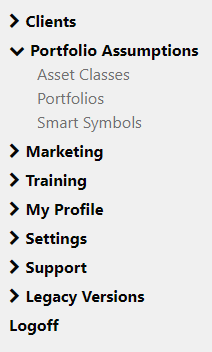
To access Smart Symbols, log into the Covisum portal: www.covisum.com and locate the login button in the upper right corner of the page. Once you login find 'Portfolio Assumptions on the left side navigation menu.
If you have not created any Smart Symbols, you’ll see this screen.

To add a new Smart Symbol, click the add new button. From here, you can enter in your Smart Symbol and map it to a holding or select a default holding. Click save mapping and your Smart Symbol is saved.

You can add or delete Smart Symbols at any time from this page.